The order lifecycle

From tap to task,
every step tracked

Place an order in minutes, pay securely, and watch it move through 7 clear checkpoints — right up to your doorstep and a WhatsApp confirmation.

01 Book 02 Pay 03 Confirm 04 Assign 05 Accept 06 Complete 07 Notify
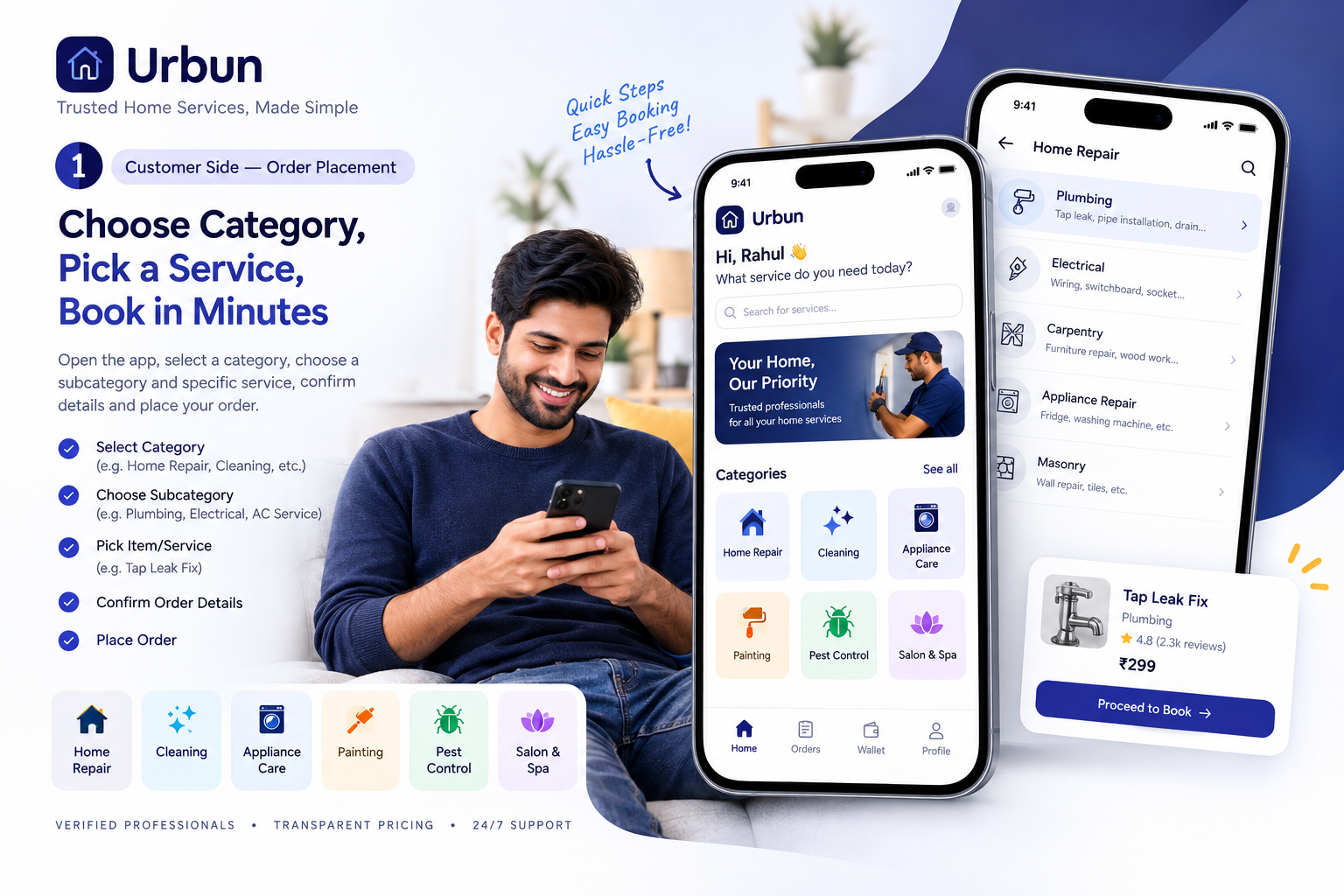
Urban app — Choose category, pick a service, book in minutes
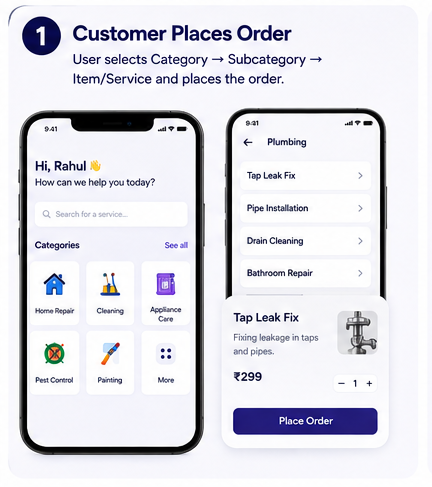
Step 1 — Customer places order on Urban app
01
Customer Side

You place the order

Open the Urban app, select a category (e.g. Home Repair), choose a subcategory (e.g. Plumbing), pick the exact service (e.g. Tap Leak Fix), and place your order.

  • Select category → subcategory → service
  • Add your address and preferred time slot
  • Review order details and confirm
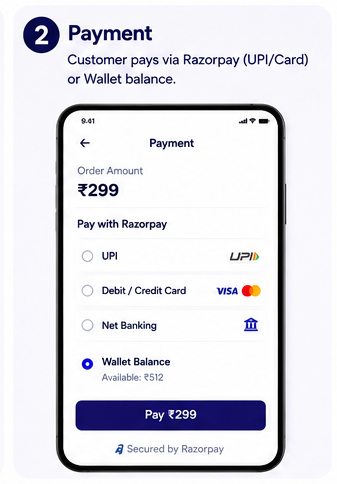
Step 2 — Secure payment via Razorpay UPI or Wallet
02
Secure Checkout

Pay securely

Pay via Razorpay using UPI, Debit/Credit Card, Net Banking, or your Urban Wallet balance. All transactions are encrypted and instant — secured by Razorpay.

  • UPI, Card, Net Banking, or Wallet
  • Instant payment confirmation
  • Secured by Razorpay — 100% safe
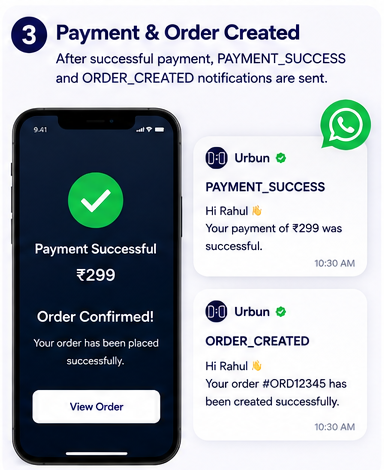
Step 3 — Payment successful and order created with WhatsApp notification
03
💬 WhatsApp Update

Order confirmed instantly

As soon as payment succeeds, your order is created and you receive two WhatsApp messages — PAYMENT_SUCCESS and ORDER_CREATED — so you know it's live immediately.

  • Payment success notification sent
  • Order #ID created in the system
  • WhatsApp alerts delivered instantly
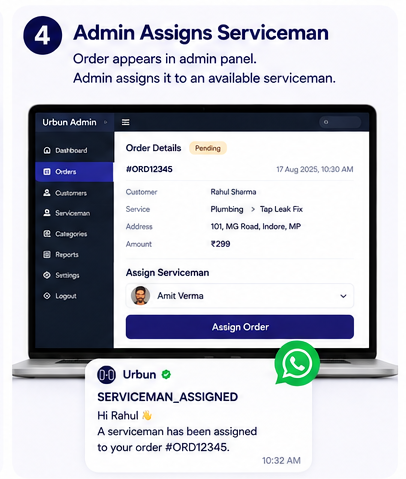
Step 4 — Admin assigns serviceman from admin panel
04
Admin Panel

Admin assigns a Serviceman

Our operations team reviews your order in the Urban Admin panel, selects the best available, verified Serviceman in your area, and assigns the job — all within minutes.

  • Order reviewed by Urban ops team
  • Best-matched Serviceman selected
  • WhatsApp — SERVICEMAN_ASSIGNED sent
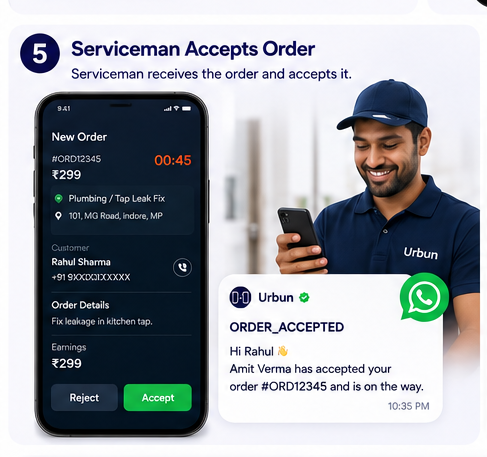
Step 5 — Serviceman accepts the order on Urban Guru app
05
💬 WhatsApp Update

Serviceman accepts & is on the way

The assigned Serviceman receives the job on their Urban Guru app. They accept the order (within a 45-second window), and you instantly get a WhatsApp update — ORDER_ACCEPTED.

  • Serviceman gets 45-sec acceptance window
  • Order accepted → Guru heads to your home
  • WhatsApp — ORDER_ACCEPTED with Guru name
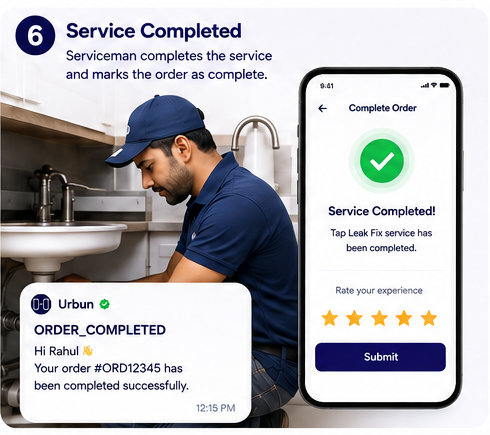
Step 6 — Serviceman completes the job and marks order complete
06
At Your Doorstep

Service completed at home

The Serviceman arrives, completes the job, and marks the order as complete on their app. You get a completion screen and are prompted to rate your experience.

  • Work done at your home
  • Serviceman marks order complete
  • Rate your Guru — helps the community
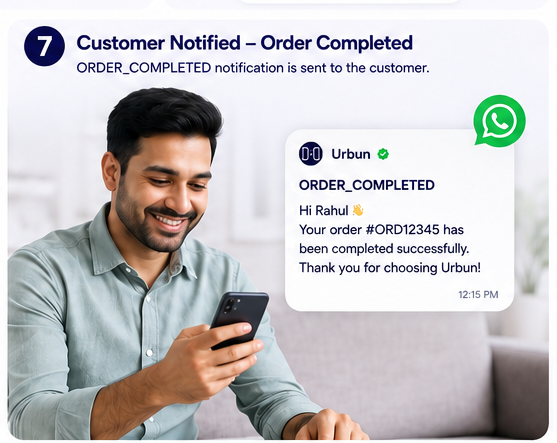
Step 7 — Customer notified via WhatsApp that order is completed
07
💬 WhatsApp Update

You're notified — all done!

You receive the final ORDER_COMPLETED WhatsApp notification. Your order is logged in your Urban history with a full receipt, and the order lifecycle is complete.

  • ORDER_COMPLETED WhatsApp delivered
  • Full order history saved in your app
  • Rate & review your experience

Ready for your first order?

Book a service in under a minute and experience Urban's fully tracked home service flow.

Browse Services